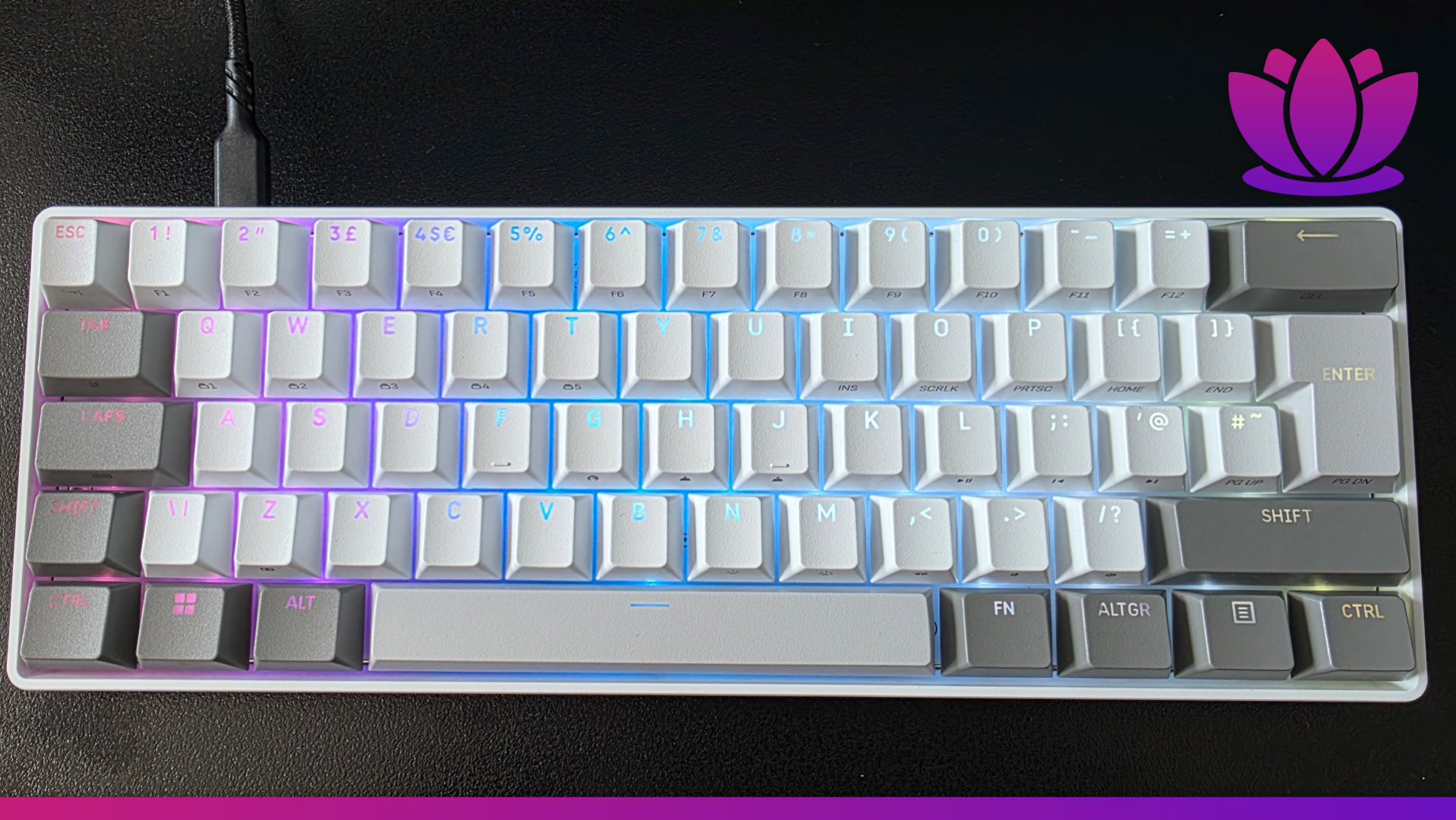
Image credit: Josie Clark for Kyusai
Competitive gaming doesn’t have to be expensive; you can still excel in the best esports games without breaking the bank. That’s the ethos of the Corsair Clipper Pro Mini 60, an affordable deck with leading specs and a surprisingly light and durable design. Kyusai’s full Corsair Clipper Pro Mini 60 review outlines exactly why the company’s commitment to the budget and mid-range market pays off so well in 2026, even if it’s not without some flaws.
Corsair Clipper Pro Mini 60 price & availability
The Corsair Clipper Pro Mini 60 is available now for $89.99 / £89.99 / €99.99 in territories such as the US, UK, and wider Europe, respectively. It’s more expensive than many similarly sized decks from the company’s competitors, like the Razer Huntsman Mini, the GXTrust 873, and the GravaStar Mercury K1 Lite. Given the tech inside, though, you can see where that extra cash has gone.
Corsair Clipper Pro Mini 60 design & features

True to its namesake, the Corsair Clipper Pro Mini 60 is a smaller 60% gaming keyboard, which is about as sleek and slight as you can get to retain full gaming and productivity functionality. It is ultra-compact with its space-saving layout, focusing only on the essential keys needed for everyday work and gaming; no arrow keys, no dedicated function row, etc. You can still use all those things with keyboard shortcuts, if needed, though.
Available in both white and black colorways, it’s a genuinely fetching deck, and it’s bolstered by some solid per-key RGB lighting. My Corsair Clipper Pro Mini 60 review unit came in the white variant, and I think it’s the nicer of the two; it better accents the light and darker gray keys around the perimeter and stands out more on my desk.
Tech-wise, the Clipper Pro Mini 60 excels with its 8,000Hz polling rate as standard. Given the fact that it’s a wired deck (expected for its price point), you won’t have to worry about the usual drawbacks of an 8K connection, such as the heavy battery drain. So once it’s plugged in and set up, you can use it to its full 0.125ms potential. As a Hall Effect deck, you get the adjustable actuation possible from the magnetic switches and sensors, with measurements as incremental as 0.01mm, without the usual wear and tear of the metal-on-metal contact of a standard mechanical keyboard.
The Clipper Pro Mini 60 features the same all-star MGX Hyperdrive switches as seen in the pricier (and not quite as good) Corsair Makr Pro 75. They’re the best thing about that gaming keyboard, and the Hall Effect switches are even better on the lighter and cheaper deck here. That means the full adjustable actuation range of 0.2mm to 3.8mm with that smooth, linear feel afforded by the magnetic technology. The two layers of sound dampening for the Clipper also keep the audible clacking and key presses down to a minimum as well.
Corsair Clipper Pro Mini 60 performance

As an esports gaming keyboard, there’s very little that I can fault the Corsair Clipper Pro Mini 60 for, particularly for its price point. The MGX Hyperdrive switches really are its saving grace, as they feel amazing when playing the likes of CS2 and VALORANT, where precise movement is needed for weapon accuracy and survival.
I was using the Corsair Clipper Pro Mini 60 throughout the peak of my VALORANT addiction and had great success when playing Competitive. The adjustable actuation is what sets this 60% deck apart; it’s a feature that’s rarely seen for the form factor, as Hall Effect models are still fairly uncommon even in 2026. Through the Corsair Web Hub, which is thankfully lightweight and intuitive, unlike Razer Synapse or Cherry MagCrate, you can easily customize your actuation level, the RGB lighting, and rebind any keys for your optimal use case.
If you are thinking of using the Clipper Pro Mini 60 for competitive gaming, though, there’s something that you need to disable right away. That being the Flashtap SOCD. Corsair’s marketing claims this feature “enables cleaner directional inputs and sharper counter-strafing”; however, just like Razer Snap Tap and Wooting’s Snappy Tappy, it’s keyboard scripting, and (thankfully) the likes of Riot’s Vanguard and Valve’s VAC Live will detect it and kick you from the server if it’s used.
In my testing in non-competitive games, such as a recent replay of Cyberpunk 2077 and indie FPS titles such as WHIPLASH, I found that Flashtap worked just as well as those other Simultaneous Opposing Cardinal Directions scripts, but I quickly disabled it when jumping back into a competitive game, and you should too. Learn to counter-strafe, people; it’s not that hard. Eventually, companies will stop pushing a banned feature onto a market that doesn’t want or need it, but for now, it is what it is.
Extended working sessions on the Corsair Clipper Pro Mini 60 were more mixed. While I enjoyed how smooth and consistent the switches felt, with my average typing speed of 75 WPM achieved via TypingTest, after a while I was starting to miss having proper arrow keys. If you’re someone like me who writes and edits for a living, then it may begin to bother you, too. Having to use a few multi-finger keyboard shortcuts to do otherwise basic things on a deck did become a little annoying. However, that’s more so a criticism of a 60% layout than anything specific to this deck, really.
Ultimately, the Corsair Clipper Pro Mini 60 is a stellar small-form-factor gaming keyboard with a few minor caveats. While no rival for a proper Tunnel magnetoresistance setup, as seen on the Cherry XTRFY MX 8.2 Pro TMR, the MGX Hyperdrive switches Hall Effect switches are still among the best that I’ve ever used in my decade or so of reviewing gaming keyboards. If you’re after an affordable and punchy deck that won’t break the bank, then the Clipper could be for you.
FAQs
The Corsair Clipper Pro Mini 60 release date was June 11, 2026.
The Corsair Clipper Pro Mini 60 price is $89.99 / £89.99 / €99.99.
Yes, TMR keyboards are better than Hall Effect because of how the magnetic technology is used. TMR is Tunnel Magnetoresistance, which measures the difference in resistance, whereas Hall Effect measures changes in voltage. Both are far superior to standard mechanical keyboards, though, as there’s no metal-on-metal contact.