Image credit: Maddie Verboom for Kyusai
To be perfectly honest, I did not expect the Secretlab Magnus Pro to live up to its price tag. It’s by far the most expensive desk I’ve ever used. My XL model comes in at a steep $1,049 as a starting price, and yet the more time I spend with this desk, the more satisfied I feel with it. Before we talk about how this desk blew me away, let’s dive into its specifications
Specifications and quality
The Magnus Pro comes in two sizes, standard and XL, and both are available in black and white. The standard size has a desktop of 150cm by 70cm, compared to the XL’s humongous 177cm x 80cm. Neither is by any means small, but the XL is absolutely huge.
The minimum height is 65cm, with a maximum of 125cm. In my last review of a desk, the Arozzi Arena Nordico, I complained about a minimum height that was still far too high, and I am very happy to report that the Magnus Pro has no such issues. Both my partner and I can use this desk comfortably.
The desk is heavy, though, with the XL desktop alone weighing a whopping 32.9 kilograms. The weight and size made carrying it up the stairs into my apartment somewhat arduous, but you can clearly see where the weight goes. Every part of the desk feels high quality, from the magnets to the hinges.
The cable management features are extremely neat, though I found that using them means I need to pick up a few longer cables to truly make the most of them.

Assembly
I already mentioned that the weight made it quite a task to get the desk ready for assembly; luckily, thanks to its stellar design and packaging, that was also the hardest part of the whole process. Every set of bolts is separated and clearly labeled, and the instructions are direct and thorough. It took less than half an hour for me to assemble the desk with some assistance, and I have no doubt that it would have been just as easy, if slightly slower, had I done it by myself.
Accessories
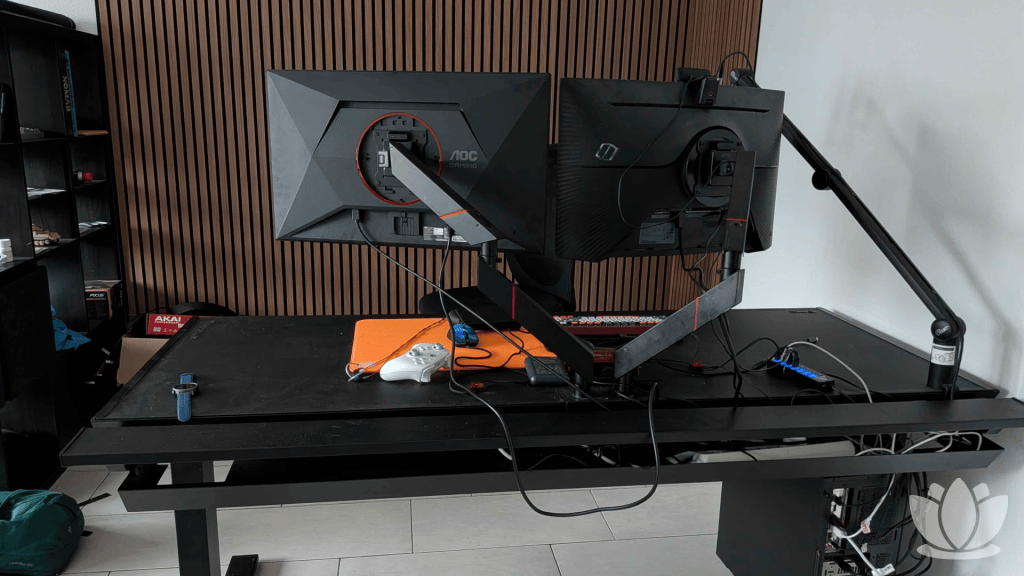
The Magnus Pro comes with an entire range of optional accessories at varying price points. None of them will be the best option in terms of cost-to-performance, but they’ll all integrate nicely with your desk and come with a matching design. Something you have no other way of getting. My review order included the mousepad, dual-monitor arm, cable management accessories, and PC mount.
Like the desk itself, the accessories all feel high-quality, with thoughtful designs that maximize user comfort and ease of installation. The monitor arms feel and look great and easily hold up my fairly heavy 27-inch monitors, something I’ve had some issues with in the past.
The PC mount is easy to set up and works with a variety of cases. Obviously, it adds the benefit that you don’t have to worry about the length of your cables when raising the height of your desk.
The only accessory I had some issues with was actually the mousepad. I can’t say whether it’s the mousepad itself or the desktop that’s causing it, since it’s metal, but my wireless mice all seem to have issues tracking directly on the mousepad. It isn’t a dealbreaker for me as I was always going to layer another mousepad over it anyway, but it should be noted for those of you who weren’t planning on this but are using a wireless mouse, like the Logitech G Pro X2 Superstrike.
Is it worth it?
Going into this, I didn’t expect all that much from this desk. I mean, it’s a desk. But its high quality and, in my opinion, good looks have made this desk a fantastic piece of furniture to use, and I have no qualms about having it in my living room as the first thing I see when I enter my apartment but it would pair well with one of the best gaming chairs, like the Herman Miller X Logitech Embody Gaming chair.
I don’t think it’ll ever be entirely possible for a desk of this price to fully justify itself. There will always be options that do almost everything this desk does while being almost as good. For gamers looking closely at their budget, I do not recommend this. But if you have the room for it and you want a high-quality desk that is sure to last for years while looking the part, I don’t know of any better options short of becoming a carpenter.
FAQs
This depends entirely on your budget. If you’re on a tighter budget, then it’s not, but if you’re looking for something special, then that question is very much up in the air
The Magnus Evo is a new model meant to bring some of the features and quality of the Pro to a more accessible price point by offering a few fewer features, such as the magnetic deskpad.
No, you can use whatever you want for monitor mounts or cable management; just measure ahead of time to ensure it fits in the space.
The Secretlab Magnus Pro XL is the same desk, just coming in at almost 20cm longer and 10cm wider